How to hide your facebook profile photo from everyone

Hello welcome to HALZUTRIK, friends, in today's article we will tell you how you can hide your Facebook profile photo from everyone, that is, we will tell you a trick so that no one can see your Facebook profile photo. Will be able
Friends, Facebook is such a social media platform, on which everyone is connected with their friends in the country and abroad. When you come, such features have come in Facebook which are making Facebook better like Facebook reels, Facebook watch, Facebook page etc. Such new features have been added to Facebook, due to which Facebook has become a great social media platform. If you are also using this best social media platform Facebook. So this article is going to be special for you because by reading this article you will get information about one of the best tricks and best settings related to Facebook.
Friends, the profile photo of Facebook is a very important thing for you because if the photos and videos uploaded in your field are not visible to anyone or not, but your profile picture can be seen by all your friends on Facebook. But if you want that you can stop showing it by applying with such tricks then it can be better.
Friends, what is your Facebook profile picture is very special for you, in this increasing era of evil, there have been many Facebook hackers too. Not only Facebook but all social media platforms and all other computers in the field of digital hackers of all kinds are now seen everywhere. That's why it is very important for you to do some privacy settings of your profile picture because if you do not do the privacy settings of Facebook then maybe hacker can hack you or hack your Facebook account. Came to avoid hackers To protect your Facebook profile from hanging, it is very important for you to do some security settings in your Facebook account.
Also read:- how to protect facebook from hacking
Just as you can protect your Facebook account from being hacked, you can show the security settings of your Facebook profile picture or what is considered very good for your privacy. By doing this setting no one will be able to see your profile picture. This has the advantage that if someone wants to misuse your profile picture, then he will not be able to see your Facebook profile picture, take a screenshot of it or download it. If you think that someone is trying to use wrong with your profile picture or someone has done any wrong thing with your profile photo then you can hide your profile pictures using this settings then anyone who wants you Why only friends will not be able to see your profile picture.
how to hide your facebook profile photo from everyone
• To hide your profile photo from Facebook, first you have to open your Facebook app and click on your profile icon to open your profile.
• After that you have to come to your profile photo which you want to hide from people.

• You can edit the privacy of the photo by clicking on the 3 dots
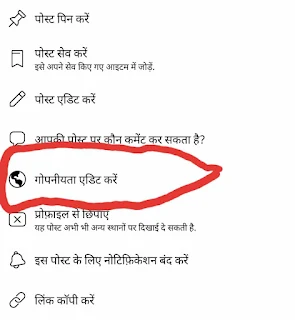
• As you edit the privacy, you will have many options, out of which you have to click on the option of "custom", which is called "only me" in Hindi.

• By doing this, your setting will be done and your profile picture will not be visible to anyone on Facebook.

So friends, this information that we have just given you that how to hide your profile picture from Facebook from all the people. By trying this method, you can hide your Facebook profile from all your friends and from all sides of Facebook, this will keep the security of your profile. So that if you think that someone can do bad with your profile picture, then now you will fail to do so because you have hidden your profile picture from everyone.



Comments
Post a Comment